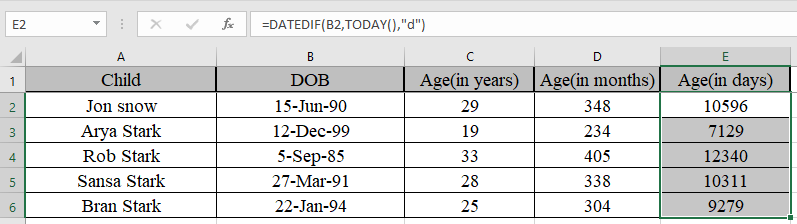
In this article, we will learn How to Calculate Number of Days in Microsoft Excel.
How can you calculate days between two dates ?
There could be a simple way to just subtract the latest date from the older date. Or you can use the Excel DATEDIF function. This function sometimes doesn't show up. You have to type it as a whole text. You can choose the today's date using the today function explained in the example to calculate the age of a person in days, months or years in Excel.
DATEDIF Function in Excel
DATEDIF function is an excel function to get the complete calendar period between the two dates. DATEDIF function in excel to get the age of a person. Basically it's a subtraction function for dates in excel as this function returns the number expressed as calendar period.
DATEDIF function returns the number of years, months and days between the given two dates in Excel.
Syntax:
| =DATEDIF(start_date, end_date, unit) |
Start_date : First date in a valid excel format
end_date : Second date in a valid excel format
Unit : unit in quotes
“y” gets the Years between dates
“m” gets the between dates
“d” gets the days between dates
"md" gets the days between dates, ignoring months and years
"ym" gets the months between dates, ignoring days and years
"yd" gets the days between dates, ignoring years
| Unit | Purpose | Meaning |
| d | days | Complete calendar days between the days |
| m | months | Complete calendar months between the days |
| y | years | Complete calendar years between the days |
| md | Days without months and years | Complete calendar days between the days as if the dates were of the same month & year |
| ym | Months without years | Complete calendar months between the days as if the dates were of the same year |
| yd | Days without years | Complete calendar days between the days as if the dates were of the same year |
Unit argument is very important.
Example :
All of these might be confusing to understand. Let's understand how to use the function using an example.
Here we have some examples to test the formula. Here given the start date and end date, we need to calculate the difference in days between dates
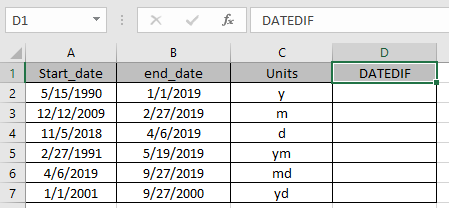
Use the Formula:
A2 : first date argument given as cell reference
B2 : Second date argument given as cell reference
C2 : specified unit
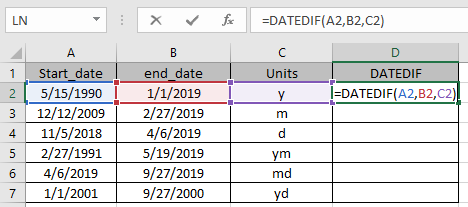
Marked boxes while using the function shows us that argument to the function given as cell reference.
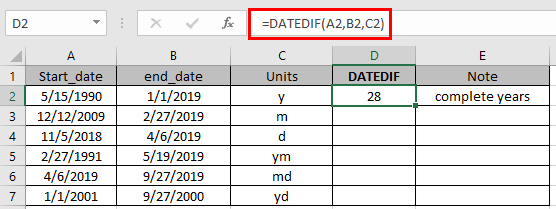
The function returns the complete calendar years between the dates using the “y”
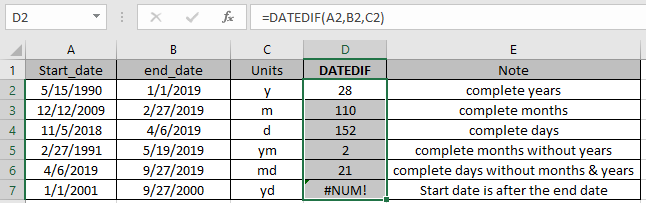
As you can see the function returns the values.
Note:
- The date in excel must be in valid format
- Unit argument to the function can be given as cell reference or directly to the function in double quotes.
- Start_date must be before the end_date or else the function will give #NUM! error
- The function gives #VALUE! Error if the date is not valid date.
One of the most used example of the function is to get the age of a person in excel.
Here below is an example to get the age of a person in excel using the DATEDIF function.
DATEDIF function is combined with TODAY function for the purpose.
TODAY function in Excel is used to generate today’s date in a cell.
Syntax:
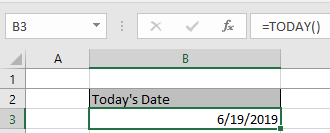
Let’s get this with an example shown below.
Here we need to calculate the age of Ned Stark’s children.
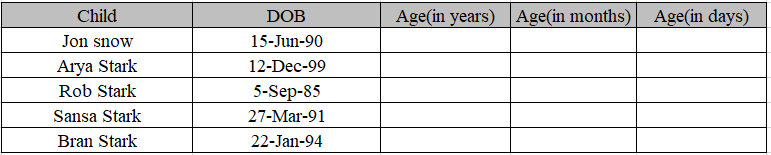
Use the formula to get the age of children.
Formula:
Date of birth is the start date in the C4 cell.
Today() function is used to get Today’s date as an end date.
“Y” to get the age in years.
| Note: Here we are using Today as an end date. You can use end date as your choice. |
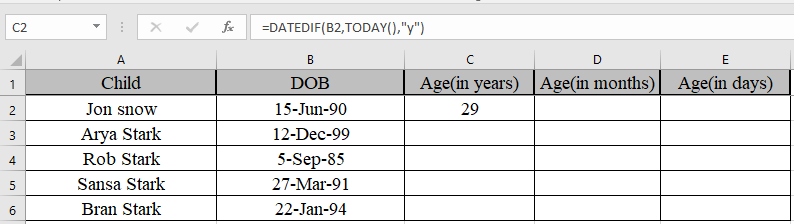
We got the age of Jon Snow using DATEDIF function
Copy the formula in other cells, select the cells taking the first cell where the formula is already applied, use shortcut key Ctrl + D to find the age of rest of the children.
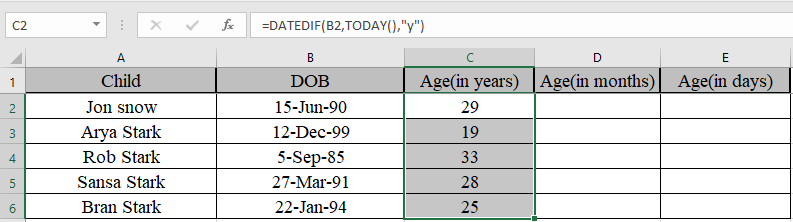
Similarly, we will find out months and days using the same function but different unit.
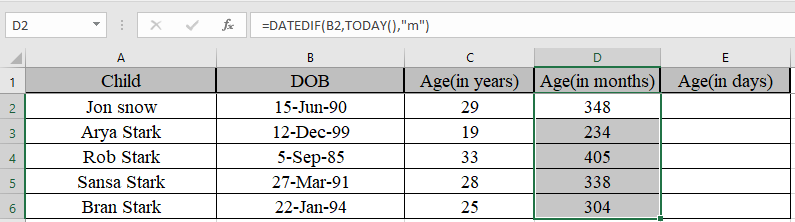
We got the age in months
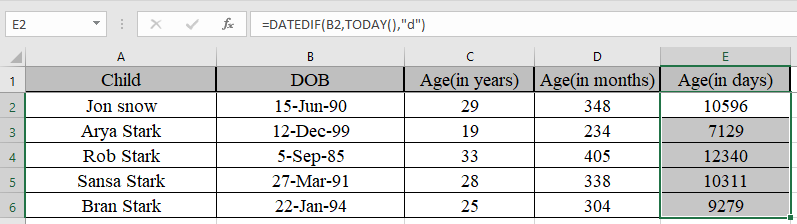
We got the age in days
Now Some of you are wondering if we need to find the years, months and days between the two dates.
Use the formula to get the years, months and days together
| =DATEDIF(B2,TODAY(),"y") & "y " & DATEDIF(B2,TODAY(),"ym")&"m " & DATEDIF(B2,TODAY(),"md") & "d" |
Explanation:
DATEDIF(B2,TODAY(),"y") & "y " denotes years between dates with string “y ” attached to the number
DATEDIF(B2,TODAY(),"ym")&"m " denotes months between dates, ignoring days and years with string “m ” attached to the number.
DATEDIF(B2,TODAY(),"md") & "d" denotes days between dates, ignoring months and years with string “d” attached to the number.
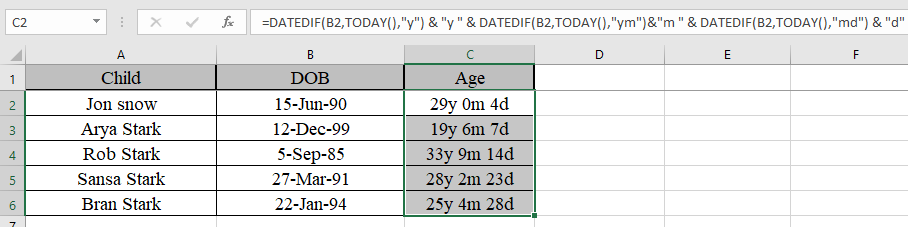
As you can see their age now. You can use this function to calculate the number of days in service in Excel.
Hope this article about How to Calculate Number of Days in Microsoft Excel is explanatory. Find more articles on calculating date and time values and related Excel formulas here. If you liked our blogs, share it with your friends on Facebook. And also you can follow us on Twitter and Facebook. We would love to hear from you, do let us know how we can improve, complement or innovate our work and make it better for you. Write to us at info@exceltip.com.
No comments:
Post a Comment